Fingerprint Authentication System Operation
The convenience features such as starting the engine, accessing personal information, unlocking profile, and exiting valet mode are available with the Fingerprint Authentication system.
When the fingerprint shape appears on the infotainment system screen, you should place your finger on the fingerprint sensor in the vehicle according to the instruction message for authorization and then you can operate the linked features without entering the password.
If the Fingerprint Authentication system does not work, pull your finger away from the fingerprint authentication sensor and then try again.
Fingerprint linked features can be turned on or off from the Settings menu.
Select: Setup > User Profile > Driver 1 (or Driver 2) > Fingerprint Identification
|
Fingerprint linked features |
Characteristic |
|
Starting engine |
Start engine with fingerprint but without smart key. |
|
Personal information access |
Use features with fingerprint but without a password. |
|
Profile unlock |
|
|
Valet mode exit |
If the same fingerprint is registered for Driver 1 and Driver 2, the authentication result is linked to Driver 1, when authentication is successful.
Place your finger on the fingerprint sensor (1) to verify your fingerprint. After it is successfully verified, start the engine by pressing the Engine Start/Stop button (2) within 30 seconds.
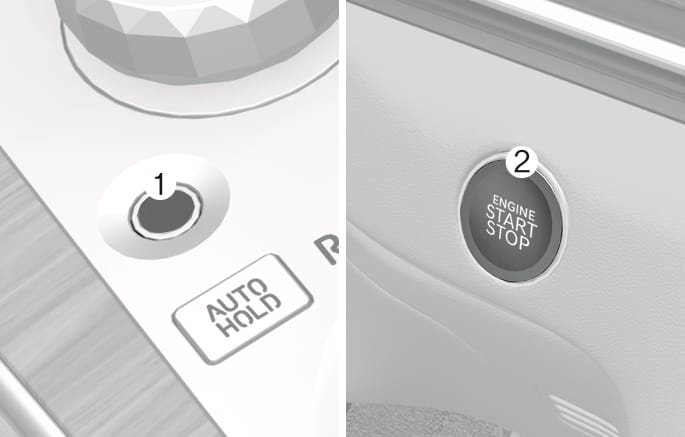
2C_FingerprintAuthenticationSensorWithStartButton
|
Fingerprint authentication status |
Light color |
Message on cluster |
|
Standby |
White |
- |
|
Succeed |
Blue |
"Authenticated. The vehicle can now be started" |
|
Fail |
Yellow |
- |
|
Restricted due to consecutive failure |
Red |
"Fingerprint authorization is locked out. Try again in XX min" |
-
Fingerprint authorization is restricted for 1 minute, 3 minutes, or 5 minutes when failed every 5 times.
-
For more information on how to start your vehicle with the Engine Start/Stop button, refer to the "Engine Start/Stop Button" section in chapter 6.
-
If you are in the vehicle for an extended period without starting the engine, the fingerprint sensor may turn off. If this occurs, depress the brake pedal and verify your fingerprint again when the fingerprint sensor illuminates.