Front Seats
Take the following precautions when adjusting your seat:
-
Never attempt to adjust the seat while the vehicle is moving. The seat could respond with unexpected movement and may cause loss of vehicle control resulting in a collision
-
Do not place anything under the front seats. Loose objects, including unsecured floor mats, in the driver's foot area could interfere with the operation of the foot pedals.
-
Do not allow anything to interfere with the normal position and proper locking of the seatback.
-
Do not place a cigarette lighter on the floor or seat.
-
Use extreme caution when picking up small objects trapped under the seats or between the seat and the center console. Your hands might be cut or injured by the sharp edges of the seat mechanism.
-
If there are occupants in the rear seats, be careful while adjusting the front seat.
-
Make sure that the seat is locked in place after the adjustment. If not, the seat might move unexpectedly resulting in an accident.
To prevent injury:
-
Do not adjust your seat while wearing your seat belt. Moving the seat cushion forward may cause strong pressure on your abdomen.
-
Do not allow your hands or fingers to get caught in the seat mechanisms while the seat is moving.
Reclining seatback
Sitting in a reclined position when the vehicle is moving can be dangerous. Even when buckled up, the protections of your restraint system (seat belts and/or airbags) is greatly reduced by reclining your seatback.
Seat belts must be snug against your hips and chest to work properly.
The more the seatback is reclined, the greater the chance for the passenger's hips to slide under the lap belt or the passenger's neck to strike the shoulder belt.
Never ride with a reclined seatback when the vehicle is moving.
Riding with a reclined seatback increases your chance of serious or fatal injuries in the event of a collision or sudden stop.
Driver and passengers should always sit well back in their seats, properly belted, and with the seatbacks upright.
Seat belts must be snug against your hips and chest to work properly. When the seatback is reclined, the shoulder belt cannot do its job because it will not be snug against your chest. Instead, it will be in front of you. During a collision, you could be thrown into the seat belt, causing neck or other injuries.
The more the seatback is reclined, the greater chance the passenger's hips will slide under the lap belt or the passenger's neck will strike the shoulder belt.
The front seat can be adjusted by using the control switches located on the outside of the seat cushion.
NEVER allow children to remain in the vehicle unattended. The power seats are operable when the vehicle is turned off.
To prevent damage to the seats:
-
Always stop adjusting the seats when the seat has been adjusted as far forward or rearward as possible.
-
Do not adjust the seats longer than necessary when the vehicle is turned off. This may result in unnecessary battery drain.
-
Do not operate two or more seats at the same time. This may result in an electrical malfunction.
Forward and rearward
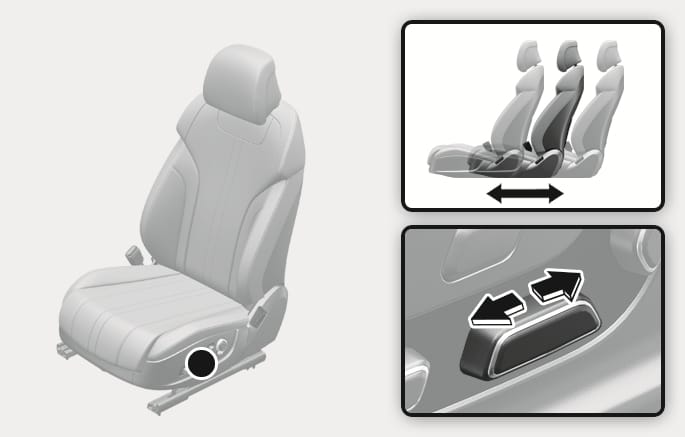
2C_AdjustSeatForwardBackwardAuto
To move the seat forward or rearward:
-
Push the control switch forward or rearward.
-
Release the switch once the seat reaches the desired position.
Seatback angle
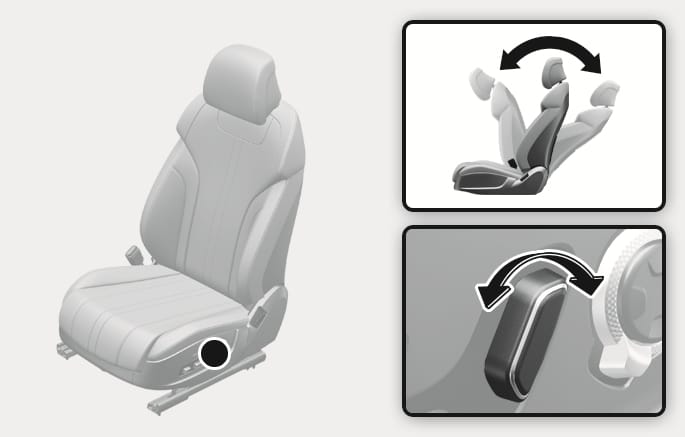
2C_AdjustSeatBackAuto
To recline the seatback:
-
Push the control switch forward or rearward.
-
Release the switch once the seatback reaches the desired position.
Seat cushion tilt/Seat height
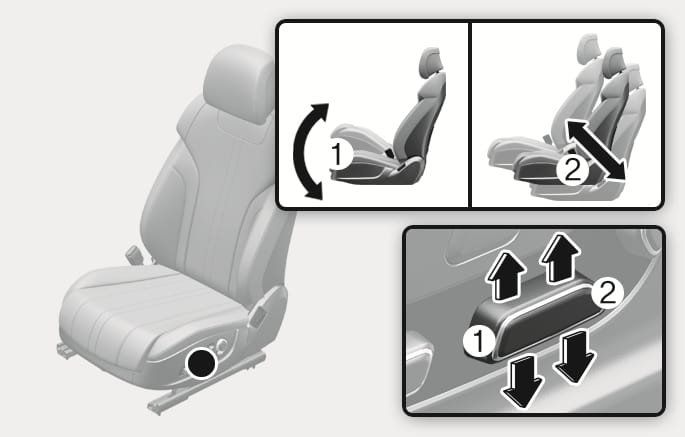
2C_AdjustSeatHeightAuto
-
Seat cushion tilt (1)
To change the angle of the front part of the seat cushion:
-
Push the front portion of the control switch up to raise or down to lower the front part of the seat cushion.
-
Release the switch once the seat reaches the desired position.
-
-
Seat height (2)
To change the height of the seat:
-
Push the rear portion of the control switch up to raise or down to lower the height of the seat.
-
Release the switch once the seat reaches the desired position.
-
Seat cushion extension
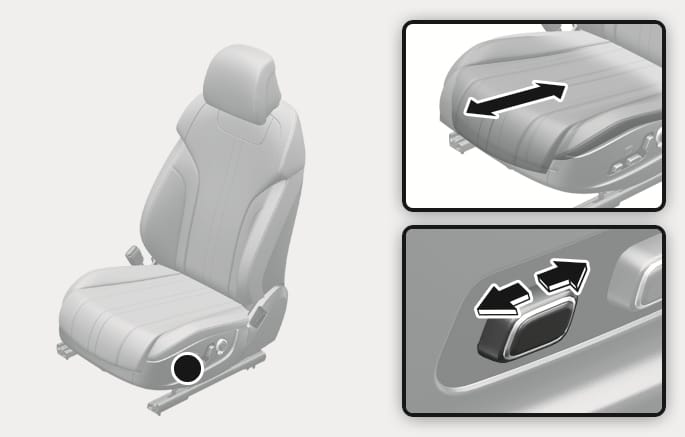
2C_SeatCushionTilt
To move the front part of the cushion forward or rearward:
-
Push the control switch forward or rearward.
-
Release the switch once the seat cushion reaches the desired length.
Seat cushion support
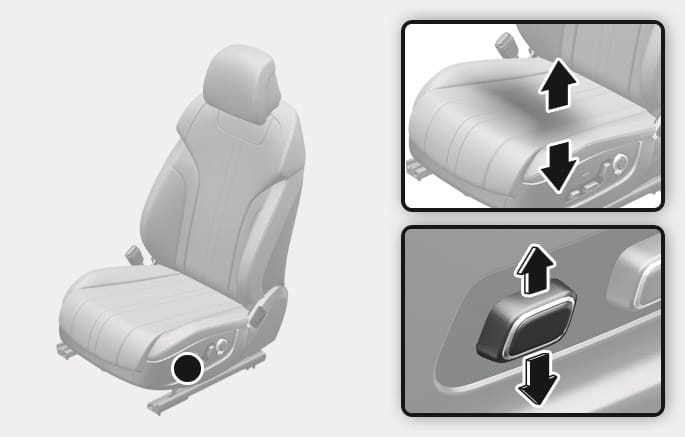
2C_SeatCushionAdjustment
To adjust cushion support:
-
Push the control switch up to increase cushion support or down to decrease cushion support.
-
Release the switch once the seat cushion support reaches the desired position.
Lumbar support
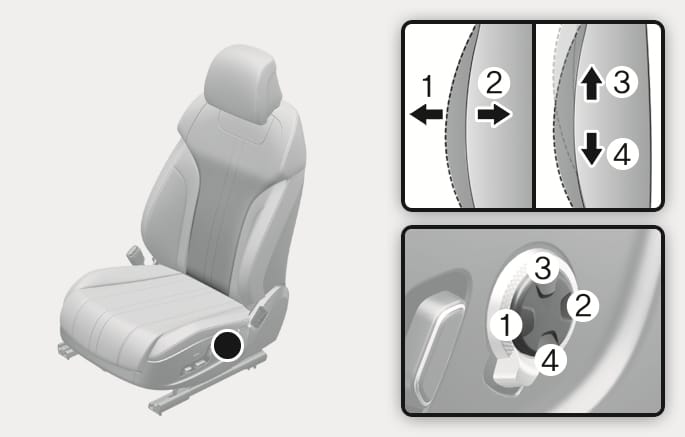
2C_AdjustSeatBackCushionAuto
To adjust the lumbar support:
-
Press the front portion of the switch (1) to increase support or the rear portion of the switch (2) to decrease support.
-
Press switch (3) or (4) to move the support position up or down.
-
Release the switch once the lumbar support reaches the desired position.
Seat bolster
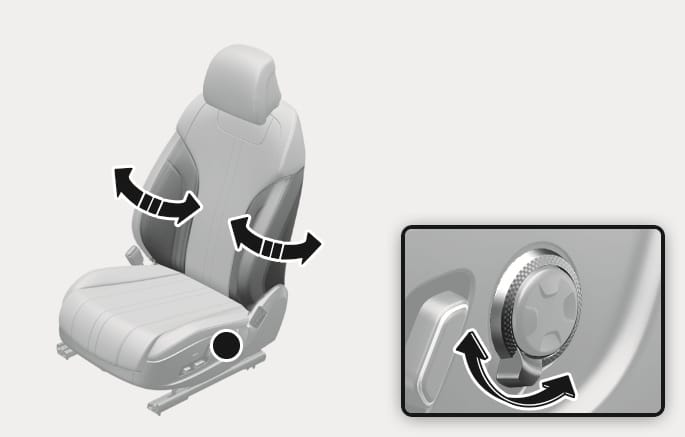
2C_AdjustSeatBolster
To adjust seat bolster:
-
Push the adjustment lever clockwise, the seatback bolster is adjusted inward. Push the switch counterclockwise, the seatback bolster is adjusted outward.
-
Release the lever once the bolster reaches the desired position.
Select Setup > Vehicle > Seat > Ergo-Motion Seat from the infotainment system's Settings menu to select and set up supplemental functions.
Before actually using each function, try the functions with the vehicle parked.
Comfortable stretch
Comfortable stretch is a function that helps relieve fatigue of the driver's pelvis and lower back due to driving.
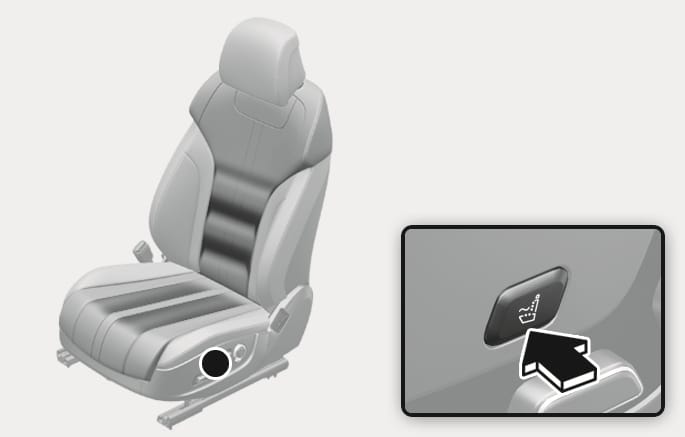
2C_ComfortStreching
Every time you press the button, you may select a mode or turn off the function in the following order.
-
Pelvic stretching: The cushion portion moves, helping the left and right movement of the pelvis.
-
Lumbar stretching: The seatback portion moves, helping back and forth movement of the lower back.
-
Whole Body stretching: The cushion and seatback moves in sequence, helping the whole body reduce fatigue.
-
Off: Turns off Comfortable Stretch.
Also, you can change the operation intensity and operation time from the Settings menu in the infotainment system.
-
Intensity: Setup > Vehicle > Seat > Ergo-Motion Seat > Comfortable Stretch > Intensity > High/Moderate
-
Time: Setup > Vehicle > Seat > Ergo-Motion Seat > Comfortable Stretch > Session Length > Long (20 min)/Medium (15 min)/Short (10 min)
Smart posture assist
After driving for an hour, Smart Posture Assist automatically adjusts the pelvis and back portion of the seat to assist the posture.
You can activate or deactivate Smart Posture Assist function from the Settings menu in the infotainment system. Select:
-
Setup > Vehicle > Seat > Ergo-Motion Seat > Smart Posture Assist
Smart support
The driver's seat bolster support increases when SPORT mode is selected for Drive Mode and when driving at high speed.
You can activate or deactivate Smart Support function from the Settings menu in the infotainment system. Select:
-
Setup > Vehicle > Seat > Ergo-Motion Seat > Smart Support
The infotainment system may change after software updates. For more information, refer to the infotainment system manual.
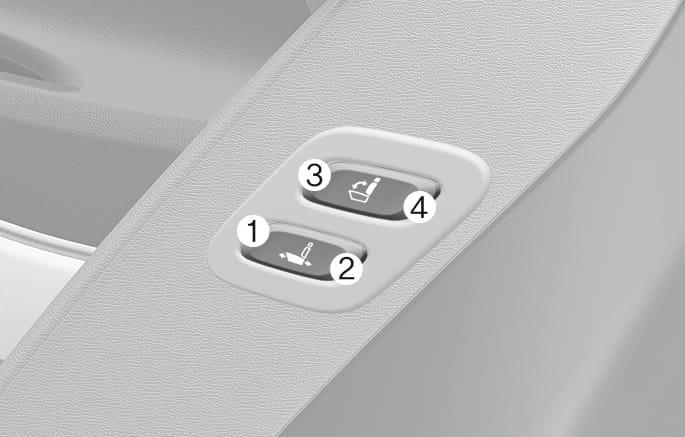
2C_WorkinSwitch
The rear seat passenger may use the switches to control the front passenger seat.
-
Sliding forward or rearward:
Press the switch (1) or (2) to move the front passenger seat forward or rearward.
-
Seatback angle:
Press the switch (3) or (4) to recline the front passenger seatback forward or rearward.
The rear passenger should not adjust the front seat when a passenger is seated.
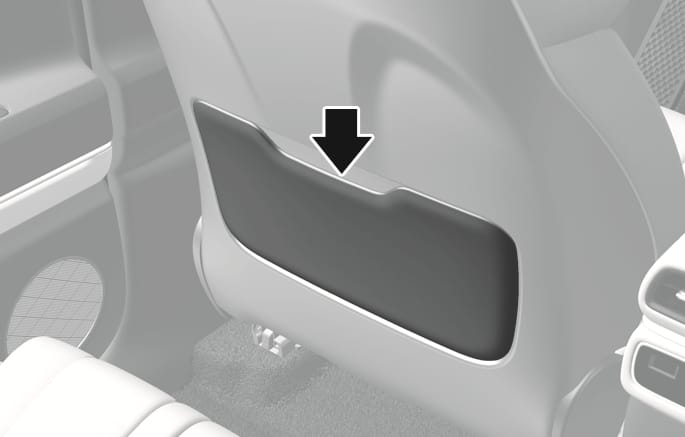
2C_SeatBackPocket
The seatback pocket is provided on the back of the front seatbacks.
Do not put heavy or sharp objects in the seatback pockets. In a collision, they can come loose from the pocket and injure occupants.