Inside rearview mirror
Before driving your vehicle, check to see that your inside rearview mirror is properly positioned. Adjust the rearview mirror so that the view through the rear window is properly centered.
Make sure your line of sight is not obstructed. Do not place objects on the rear seat or in the cargo area that may interfere with your vision through the rear window.
To prevent serious injury during a collision or deployment of the airbag, do not modify the rearview mirror and do not install a wide mirror.
Never adjust the mirror while driving. This may cause loss of vehicle control and result in a collision.
When cleaning the mirror, use a paper towel or similar material dampened with glass cleaner. Do not spray glass cleaner directly on the mirror as this may cause the liquid cleaner to enter the mirror housing.
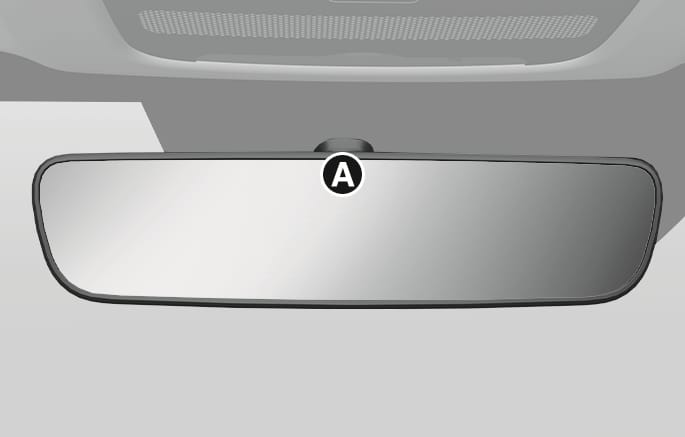
2C_InsideRearViewMirrorECM
- Indicator
When the engine is running, the glare from vehicle headlamps behind you is automatically controlled by the sensor mounted in the rearview mirror.
Whenever the gear is shifted to R (Reverse), the mirror automatically goes to the brightest setting in order to improve the driver's view behind the vehicle.
The digital center mirror is a system that uses the camera on the rear of the vehicle and displays the rear image on the screen of the digital center mirror. The digital center mirror allows the driver to see the rear view despite obstructions, such as the headrest or luggage, ensuring rear visibility.
Be sure to read the precautions and instructions before using the digital center mirror. Failure to follow the precautions and instructions for proper use of digital center mirror may result in serious injury:
-
You are responsible for driving safely when using the digital center mirror. It is not a substitute for safe driving practices. Always check the blind spot of the digital center mirror before driving.
-
Never operate the digital center mirror while driving. This may cause loss of vehicle control and result in a collision.
-
Never disassemble or modify the digital center mirror’s camera unit or wirings.
If you notice smoke or any smell coming from the digital center mirror, stop using the system immediately. We recommend that the system be inspected by an authorized retailer of Genesis Branded products.
-
The image areas displayed in the conventional rearview mirror mode and the digital center mirror mode are different. Check the image areas displayed in different modes before driving the vehicle.
-
Switch to the conventional rearview mirror mode when the digital center mirror is not functioning normally. A light beam or flash may appear if strong light sources such as direct sunlight or vehicle headlights obstruct the rearview camera.
-
Always keep the rear view camera lens clean. If the lens is blocked or covered, the digital center mirror may not operate normally. Clean with a damp soft cloth.
Digital center mirror components
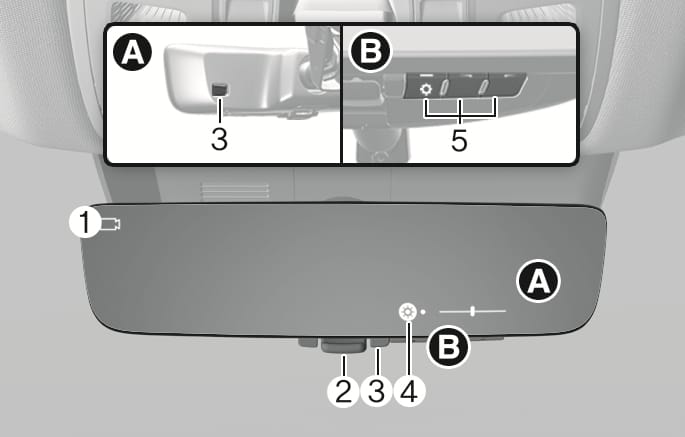
2C_DCMInsidemirrorOverview
- Camera indicator
- Mode selection lever (conventional rearview mirror/digital center mirror)
- Sensor
- Icon display area
- Menu/Adjustment button
Changing modes
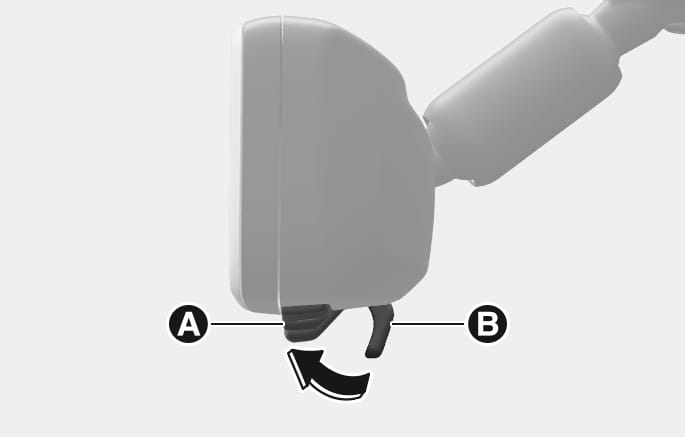
Pull the lever towards you to use the digital center mirror mode or push the lever towards the front windshield to use the conventional rearview mirror mode.
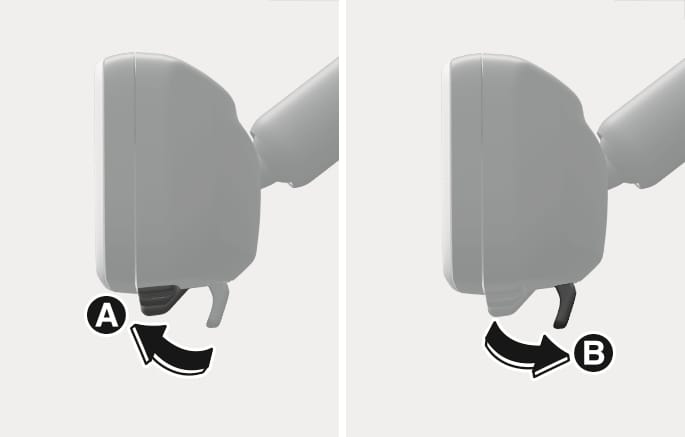
2C_DCMModeChange
- Digital center mirror mode
- Conventional rearview mirror mode
-
If the digital center mirror mode is selected, the rear view is shown on the inside rearview mirror and the camera (
Ɣ ) indicator appears on the top left side of the mirror. -
The digital center mirror turns on when the Engine Start/Stop button is in the ON or START position and turns off when the Engine Start/Stop button is in the ACC or OFF position.
-
The conventional rearview mirror can be used when the digital center mirror mode is turned off.
-
Use the conventional rearview mirror mode when the display of the digital center mirror mode seems blur due to strong light sources.
-
If the display is difficult to see due to reflected light, close the sunshade of the sunroof (if equipped).
-
When driving at night, the color of the objects displayed on the digital center mirror may differ from the actual color.
-
Depending on your physical condition or age, it may take longer than usual to focus on the displayed image. If this occurs, use the conventional rearview mirror mode.
Adjusting the mirror height
Select the conventional rearview mirror mode, adjust the height of the rearview mirror so that the view through the rear window is properly centered.
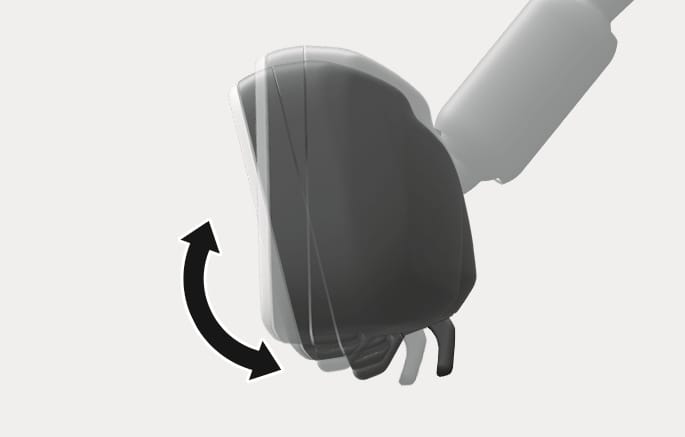
2C_DCMModeHeightAdjust
Setting the digital center mirror
-
Press the Engine Start/Stop button to the ON or START position and pull the lever towards you to use the digital center mirror mode.
2C_DCMModeHeightAdjust_1
- Digital mode
- Conventional rearview mirror mode
-
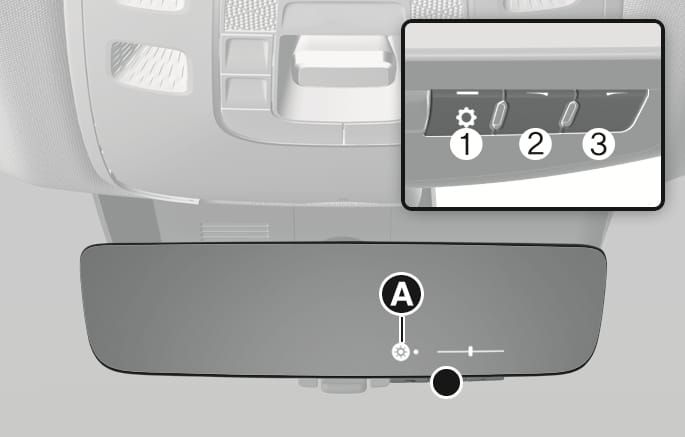
Press the menu button (1), and then press the adjustment button (2 or 3) to adjust the brightness and vertical angle of the display.
2C_DCMInsidemirrorSetting_2
-
Each time the menu button (1) is pressed the brightness (
Ń ) icon or angle (ń ) icon appears in the icon display area [A]. -
The brightness and vertical angle can be adjusted by using the adjustment button (2 or 3) when the icon is displayed.
-
If a button is not operated for about 5 seconds or more, the icon disappears, and the display cannot be adjusted.
-
Make sure the tailgate is closed before driving. When the tailgate is open, the rear image may not be displayed normally on the digital center mirror.
-
Do not let the passengers stare at the displayed image when the vehicle is being driven. It may cause motion sickness.
-
Adjust the digital center mirror to an appropriate brightness. If your eyes become tired, change the to conventional rearview mirror mode.
-
Do not block or cover the light sensors. If the light sensors are blocked or covered, the brightness may not be displayed normally.
Precautions while using the digital center mirror
-
Do not clean the mirror with cleaning agents containing thinner, benzene, alcohol, or other petroleum based cleaning products.
-
Do not contaminate the rear view camera lens with organic solvent, vehicle wax, window cleaner, or glass coating when washing the vehicle. If contaminated, wipe it off as soon as possible.
-
Clean the camera lens with a damp soft cloth. Scratching or damaging the lens surface may reduce digital center mirror performance.
-
Never disassemble or modify the digital center mirror’s camera unit or wirings, and never apply any impact on it.
-
To prevent the battery from discharging, do not use the digital center mirror when the engine is not running.
-
Do not attach an antenna of a wireless device near the digital center mirror. Electric wave from a wireless device may cause disturbed images.
-
Never rotate the body of digital center mirror more than 90 degrees or excessively press the adjustment buttons.
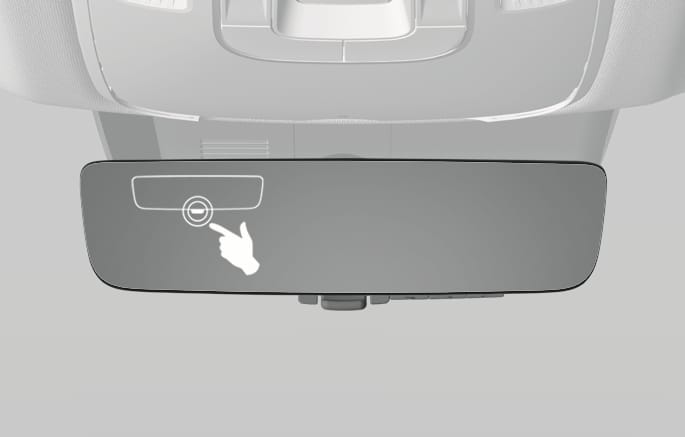
If you suspect a malfunction while using the digital center mirror, push the mode selection lever towards the front windshield to switch to the conventional rearview mirror mode. We recommend that your vehicle be inspected by an authorized retailer of Genesis Branded products.
2C_DCMMalfunction
-
If the error (
ł ) icon appears, the digital center mirror may not be working properly. Change to conventional rearview mirror mode. -
If the digital center mirror is extremely hot, the high temp (
Ł ) icon appears, and the display gradually becomes dimmer.-
If the temperature continues to increase, the digital center mirror turns off.
-
The icon disappears when the mirror becomes cool.
-