Surround View Monitor operation
Press the Parking/View button (1) to turn on Surround View Monitor.
Press the button again to turn off the function.
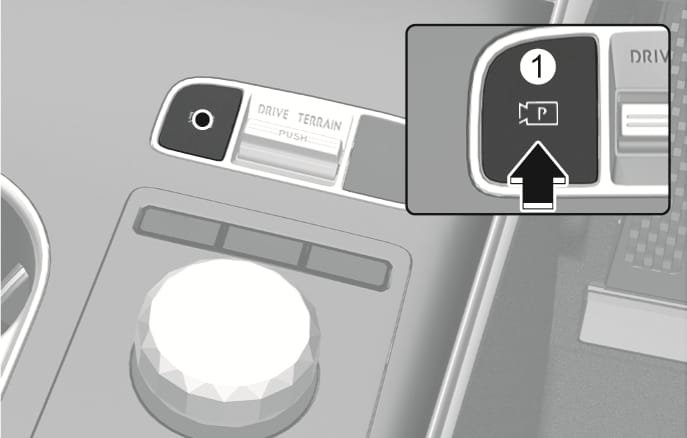
2C_ParkingViewButton
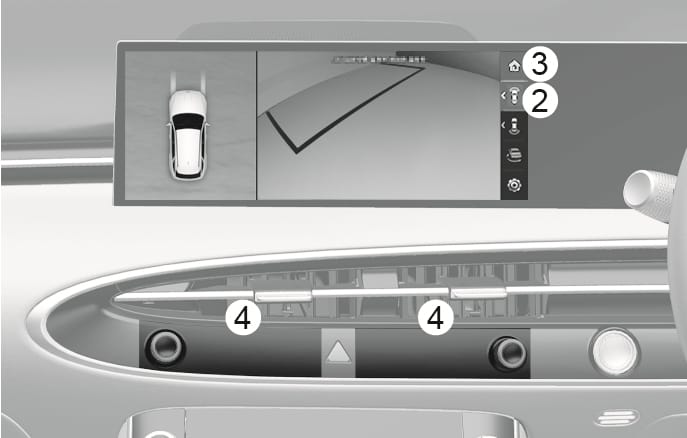
2C_SVMFrontViewInfo
The front view appears on the screen when the gear is in N (Neutral) or D (Drive) to assist parking. The front view has top view, front view, front side view, and front wide view.
View modes can be selected by pressing the view buttons (2) on the Surround View Monitor screen.
Turns on if:
-
You shift the gear from R (Reverse) to N (Neutral) or D(Drive).
-
You press the Parking/View button (1) when the gear is in P (Park), N (Neutral), or D (Drive), and your vehicle speed is 10 km/h or less.
-
Surround view monitor auto On function is operating.
(Surround view monitor auto On must be selected from the Settings menu.)
When the front view is turned on, the previous view mode appears.
Turns off if:
-
You shift the gear to P (Park) or R (Reverse).
-
You press the Parking/View button (1).
-
You press the Home button (3).
-
You press the infotainment system buttons (4).
-
Your vehicle speed is above 10 km/h.
Surround View Monitor turns off when vehicle speed is above 10 km/h. The function does not turn on again even if vehicle speed is below 10 km/h.
The front view remains on the screen whilst driving.
View modes can be selected by pressing the view buttons (2) on the Surround View Monitor screen.
Turns on if:
-
You press the Parking/View button (1) when the gear is in N (Neutral), or D (Drive), and your vehicle speed is above 10 km/h.
Turns off if:
-
You shift the gear to P (Park) or R (Reverse).
-
You press the Parking/View button (1).
-
You press the Home button (3).
-
You press the infotainment system buttons (4).
-
When the front view whilst driving is turned on, the previous view mode appears.
-
The front view whilst driving does not turn off even when the vehicle speed is below 10 km/h once it is on.
-
When the front view whilst driving is on, the front top view and side view are disabled.
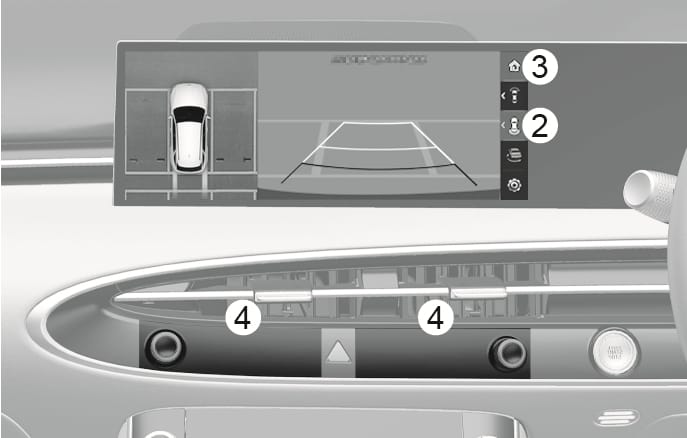
2C_SVMRearViewInfo
The rear view appears on the screen to assist parking. The rear view has top view, rear view, rear side view, and rear wide view.
View modes can be selected by pressing the view buttons (2) on the Surround View Monitor screen.
Turns on if:
-
You shift the gear to R (Reverse).
-
You press the Parking/View button (1) when the gear is in P (Park), N (Neutral), or D (Drive), and your vehicle speed is below 10 km/h.
Turns off if:
-
You shift the gear from N (Neutral) or D (Drive) to P (Park).
-
You press the Parking/View button (1) when the gear is in P (Park), N (Neutral), or D (Drive).
-
You press the Home button (3) when the gear is in P (Park), N (Neutral), or D (Drive).
-
You press the infotainment system buttons (4) when the gear is in P (Park), N (Neutral), or D (Drive).
-
Your vehicle speed is above 10 km/h when the gear is in D (Drive).
-
You shift the gear from R (Reverse) to P (Park).
The rear view cannot be turned off when the gear is in R (Reverse) even if the infotainment system buttons (4) are pressed.
The rear view remains on the screen whilst driving, it is to assist with reversing.
Turns on if:
-
You press the rear view mode from view buttons (2) after pressing the Parking/View button (1) when the gear is in N (Neutral) or D (Drive), and your vehicle speed is above 10 km/h.
Turns off if:
-
You shift the gear to P (Park).
-
You press the Parking/View button (1).
-
You press the Home button (3).
-
You press the infotainment system buttons (4).
-
When the rear view whilst driving is turned on, the last view mode appears.
-
The rear parking guidelines do not appear when the rear view is displayed whilst driving.
-
The rear view whilst driving does not turn off even when the vehicle speed is below 10 km/h.
-
When the rear view whilst driving is on, the rear top view and rear side view are disabled.
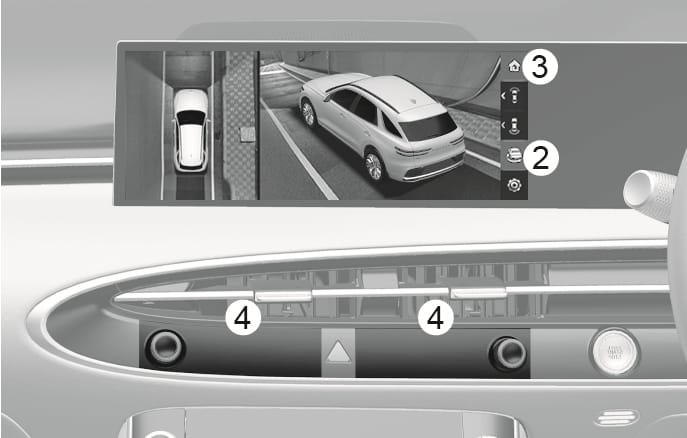
2C_SVM3DViewInfo
The 3D view shows the image around the vehicle from various angles.
Tap the screen to change vehicle angles. Press the 3D view button (2) again to return to the initial angle.
Turns on if:
-
You press the 3D view button (2) when the gear is in P (Park), N (Neutral), or D (Drive), and your vehicle speed is below 10 km/h.
-
You press the 3D view button (2) when Surround View Monitor is turned on when the gear is in R (Reverse).
Turns off if:
-
You shift the gear from N (Neutral) or D (Drive) to P (Park).
-
You press the Parking/View button (1) when the gear is in P (Park), N (Neutral), or D (Drive).
-
You press the Home button (3) when the gear is in P (Park), N (Neutral), or D (Drive).
-
You press the infotainment system buttons (4) when the gear is in P (Park), N (Neutral), or D (Drive).
-
Your vehicle speed is above 10 km/h when the gear is in D (Drive)
-
You shift the gear from R (Reverse) to P (Park).
3D view does not display guidelines.