Parking Collision-Avoidance Assist settings
2C_WarningTypeSetInfo_2
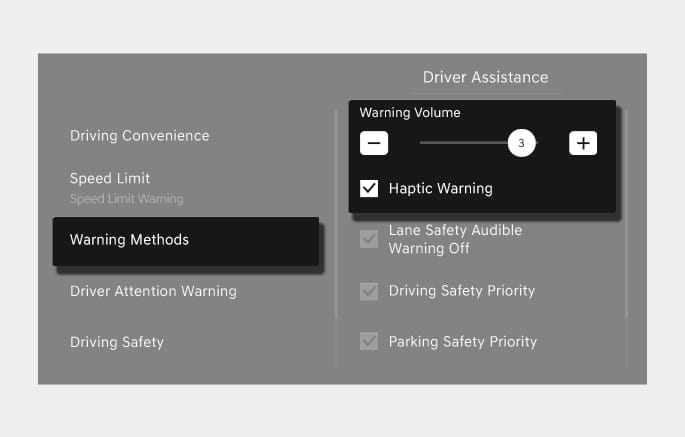
With the engine on, select Setup > Vehicle > Driver assistance > Warning methods from the Settings menu in the infotainment system to select the following:
-
Warning volume: The warning volume can be adjusted. If you set the warning volume to '0', the warning volume does not turn off but sounds as '1'.
-
Haptic warning: The steering wheel vibration can be set.
-
If you change the warning methods, the warning methods of other Driver Assistance systems may change.
-
If you set the warning volume to '0' when the haptic warning is off, the haptic warning turns on.
-
When the engine is restarted, the warning methods maintain its previous setting.
-
The setting menu may not be available for your vehicle depending on the vehicle features and specifications.
With the engine on, select Setup > Vehicle > Driver assistance > Parking safety from the Settings menu in the infotainment system to select the following:
-
If Forward/Side safety is selected, Parking Collision-Avoidance Assist warns you and assists braking when a collision with a pedestrian or object is imminent from the front or side.
-
If Backward safety is selected, Parking Collision-Avoidance Assist warns you and assists braking when a collision with a pedestrian or object is imminent from behind.
Forward/Side safety can be selected only when Backward safety is selected. When the engine is restarted and Backward safety is selected, and Forward/Side safety maintains the previous setting.
When the trailer’s connector is plugged into your vehicle, Parking Collision-Avoidance Assist automatically turns off. In this case, you cannot get help Parking Collision-Avoidance Assist. Pay extra attention when you drive when the function is inactive. (If a Genesis genuine Trailer Kit that can determine whether a trailer is connected is used)