Inside rear-view mirror
Before driving your vehicle, check to see that your inside rear-view mirror is properly positioned. Adjust the rear-view mirror so that the view through the rear window is properly centred.
Make sure your line of sight is not obstructed. Do not place objects on the rear seat or in the luggage compartment that may interfere with your vision through the rear window.
To prevent serious injury during a collision or deployment of the airbag, do not modify the rear-view mirror and do not install a wide mirror.
Never adjust the mirror whilst driving. This may cause loss of vehicle control and result in a collision.
When cleaning the mirror, use a paper towel or similar material dampened with glass cleaner. Do not spray glass cleaner directly on the mirror as this may cause the liquid cleaner to enter the mirror housing.
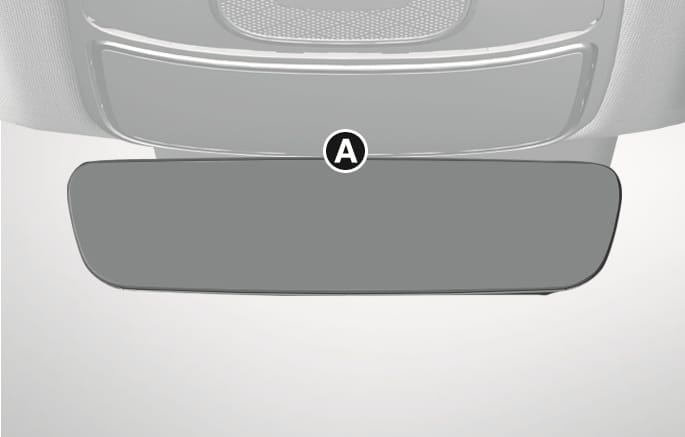
2C_InsideRearViewMirrorECM
- Indicator
When the engine is running, the glare from vehicle headlamps behind you is automatically controlled by the sensor mounted in the rear-view mirror.
Whenever the the gear is shifted to R (Reverse), the mirror automatically goes to the brightest setting in order to improve the driver's view behind the vehicle.
The digital centre mirror is a system that uses the camera on the rear of the vehicle and displays the rear image on the screen of the digital centre mirror. The digital centre mirror allows the driver to see the rear view despite obstructions, such as the headrest or luggage, ensuring rear visibility.
Be sure to read the precautions and instructions before using the digital centre mirror. Failure to follow the precautions and instructions for proper use of digital centre mirror may result in serious injury:
-
The driver is responsible for driving safely when using the digital centre mirror. It is not a substitute for safe driving practices. Always check the blind spot of the digital centre mirror before driving.
-
Never operate the digital centre mirror whilst driving. This may cause loss of vehicle control and result in a collision.
-
Never disassemble or modify the digital centre mirror’s camera unit or wirings.
If you notice smoke or any smell coming from the digital centre mirror, stop using the system immediately. We recommend that the system be inspected by an authorised Genesis repairer.
-
The image areas displayed in the conventional rear-view mirror mode and the digital centre mirror mode are different. Check the image areas displayed in different modes before driving the vehicle.
-
Switch to the conventional rear-view mirror mode when the digital centre mirror is not functioning normally. A light beam or flash may appear if strong light sources such as direct sunlight or vehicle headlamps obstruct the rear-view camera.
-
Always keep the rear view camera lens clean. If the lens is blocked or covered, the digital centre mirror may not operate normally. Clean with a damp soft cloth.
Digital centre mirror components
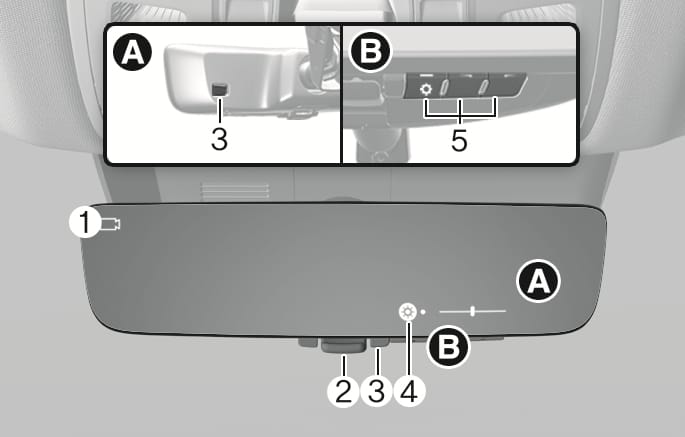
2C_DCMInsidemirrorOverview
- Camera indicator
- Mode selection lever (conventional rear-view mirror/digital centre mirror)
- Sensor
- Icon display area
- Menu/Adjustment button
Changing modes
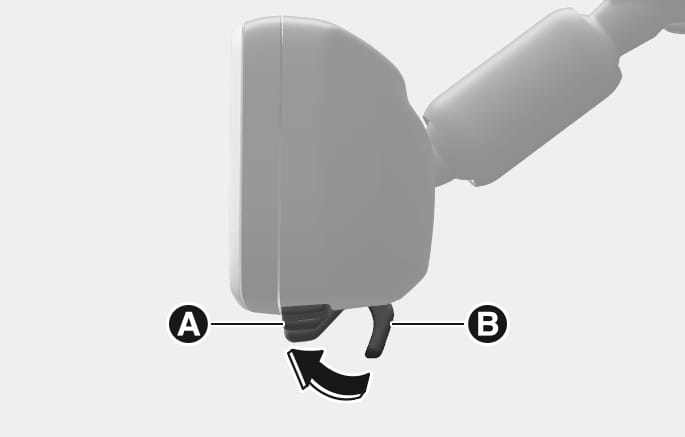
Pull the lever towards you to use the digital centre mirror mode or push the lever towards the front windscreen to use the conventional rear-view mirror mode.
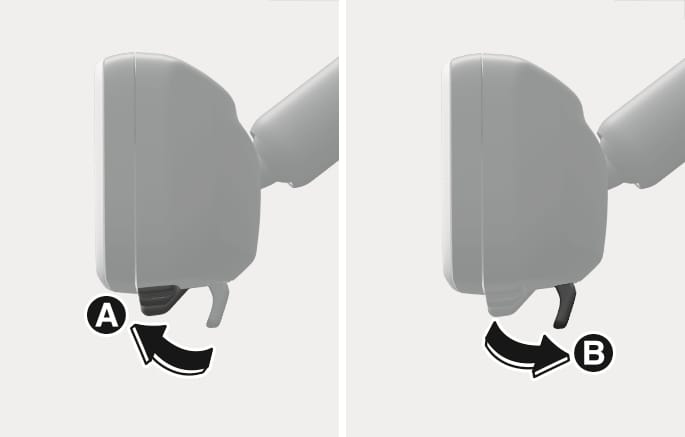
2C_DCMModeChange
- Digital centre mirror mode
- Conventional rear-view mirror mode
-
If the digital centre mirror mode is selected, the rear view is shown on the inside rear-view mirror and the camera (
Ɣ ) indicator appears on the top left side of the mirror. -
The digital centre mirror turns on when the Engine Start/Stop button is in the ON or START position and turns off when the Engine Start/Stop button is in the ACC or OFF position.
-
The conventional rear-view mirror can be used when the digital centre mirror mode is turned off.
-
Use the conventional rear-view mirror mode when the display of the digital centre mirror mode seems blurred due to strong light sources.
-
If the display is difficult to see due to reflected light, close the sunshade of the sunroof (if equipped).
-
When driving at night, the colour of the objects displayed on the digital centre mirror may differ from the actual colour.
-
Depending on your physical condition or age, it may take longer than usual to focus on the displayed image. If this occurs, use the conventional rear-view mirror mode.
Adjusting the mirror height
Select the conventional rear-view mirror mode, adjust the height of the rear-view mirror so that the view through the rear window is properly centred.
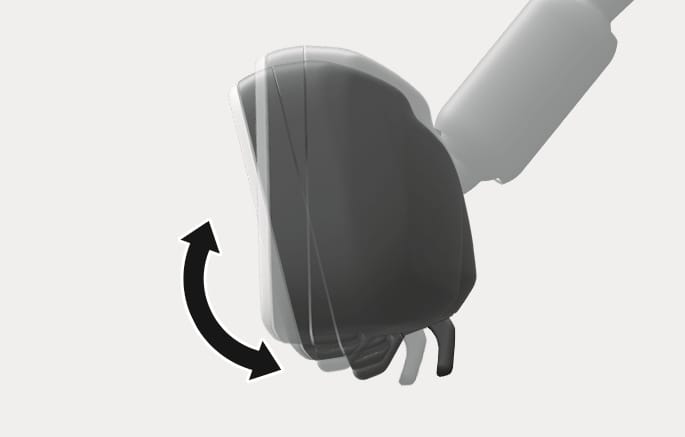
2C_DCMModeHeightAdjust
Setting the digital centre mirror
-
Press the Engine Start/Stop button to the ON or START position and pull the lever towards you to use the digital centre mirror mode [A].
2C_DCMModeHeightAdjust_1
- Digital centre mirror mode
- Conventional rear-view mirror mode
-
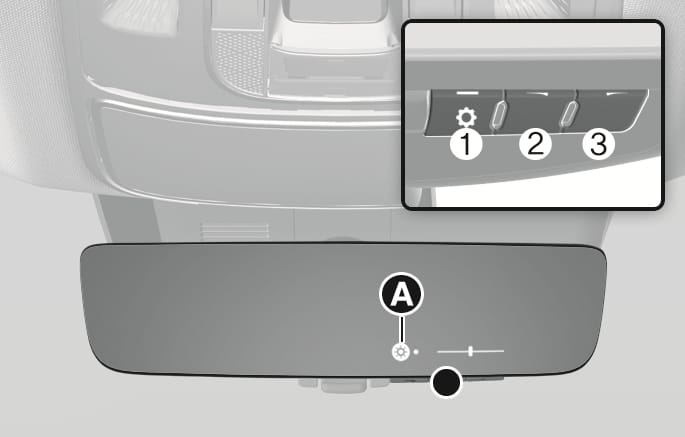
Press the menu button (1), and then press the adjustment button (2 or 3) to adjust the brightness and vertical angle of the display.
2C_DCMInsidemirrorSetting_2
-
Each time the menu button (1) is pressed the brightness (
Ń ) icon or angle (ń ) icon appears in the icon display area [A]. -
The brightness and vertical angle can be adjusted by using the adjustment button (2 or 3) when the icon is displayed.
-
If a button is not operated for about 5 seconds or more, the icon disappears, and the display cannot be adjusted.
-
Make sure the tailgate is closed before driving. When the tailgate is open, the rear image may not be displayed normally on the digital centre mirror.
-
Do not let the passengers stare at the displayed image when the vehicle is being driven. It may cause motion sickness.
-
Adjust the digital centre mirror to an appropriate brightness. If your eyes become tired, change the to conventional rear-view mirror mode.
-
Do not block or cover the light sensors. If the light sensors are blocked or covered, the brightness may not be displayed normally.
Precautions whilst using the digital centre mirror
-
Do not clean the mirror with cleaning agents containing thinners, benzene, alcohol, or other petroleum based cleaning products.
-
Do not contaminate the rear view camera lens with organic solvent, vehicle wax, window cleaner, or glass coating when washing the vehicle. If contaminated, wipe it off as soon as possible.
-
Clean the camera lens with a damp soft cloth. Scratching or damaging the lens surface may reduce digital centre mirror performance.
-
Never disassemble or modify the digital centre mirror’s camera unit or wirings, and never apply any impact on it.
-
To prevent the battery from discharging, do not use the digital centre mirror when the engine is not running.
-
Do not attach an antenna of a wireless device near the digital centre mirror. Electronic waves from a wireless device may cause disturbed images.
-
Never rotate the body of digital centre mirror more than 90 degrees or excessively press the adjustment buttons.
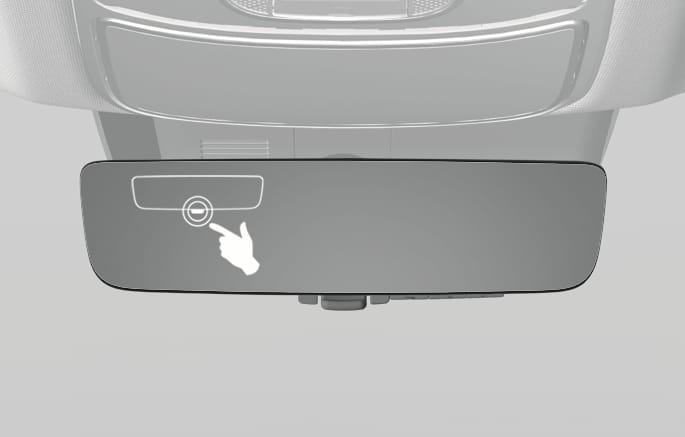
If you suspect a malfunction whilst using the digital centre mirror, push the mode selection lever towards the front windscreen to switch to the conventional rear-view mirror mode. We recommend that your vehicle be inspected by an authorised Genesis repairer.
2C_DCMMalfunction
-
If the error (
ł ) icon appears, the digital centre mirror may not be working properly. Change to conventional rear-view mirror mode. -
If the digital centre mirror gets extremely hot, the high temp (
Ł ) icon appears, and the display gradually becomes dimmer.-
If the temperature continues to increase, the digital centre mirror turns off.
-
The icon disappears when the mirror cools down.
-