Surround View Monitor operation
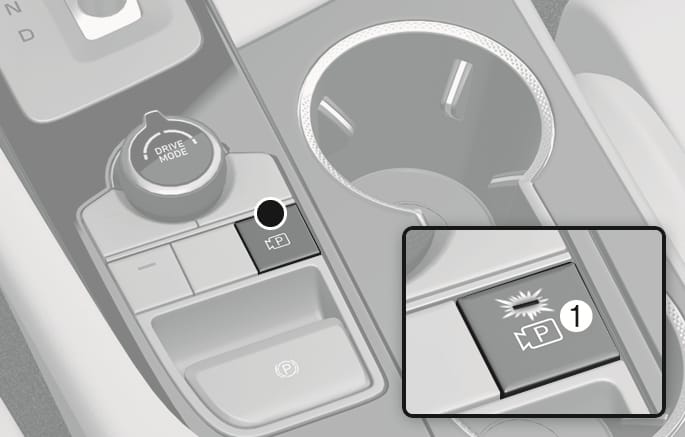
OIK073065
Press the Parking/View button (1) to turn on Surround View Monitor.
Press the Parking/View button (1) again to turn off the function.
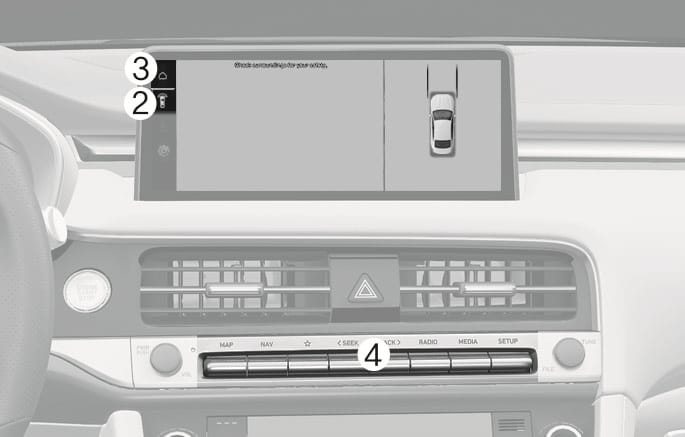
OIK073241N
The front view appears on the screen when the gear is in N (Neutral) or D (Drive) to assist in parking.
You may select top view, front view, and side view using the change view button (2).
Operating conditions
-
The gear is shifted to N (Neutral) or D (Drive) from R (Reverse) and the vehicle speed is 6 mph (10 km/h) or less.
-
The Parking/View button (1) is pressed, while the gear is in N (Neutral) or D (Drive), and vehicle speed is 6 mph (10 km/h) or less.
-
The Parking Distance Warning occurs while the gear is in D (Drive). (When Setup > Vehicle > Driver Assistance > Parking Safety > Surround View Monitor Auto On is selected from the Settings menu in the infotainment system)
When the front view is activated, the latest used view mode appears.
Off conditions
-
The gear is shifted from N (Neutral) or D (Drive) to P (Park) or R (Reverse).
-
The Parking/View button (1), the home button (3), or the infotainment system button (4) is pressed.
-
Vehicle speed is above 6 mph (10 km/h).
Surround View Monitor may turn off when vehicle speed is above 6 mph (10 km/h). However, Surround View Monitor may not turn on again although vehicle speed drops below 6 mph (10 km/h).
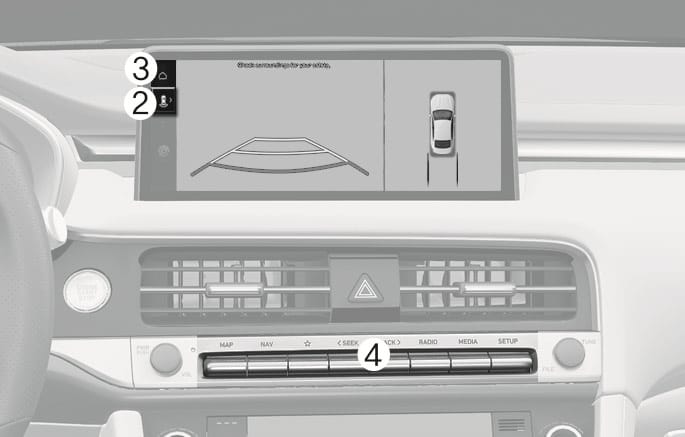
OIK073267N
The rear view appears on the screen to assist in parking.
You may select rear top view, rear view, and rear side view using the change view button (2).
Operating conditions
-
The gear is shifted to R (Reverse).
-
Press the Parking/View button (1) while the gear is in P (Park).
Off conditions
-
The gear is shifted to P (Park) from R (Reverse).
-
The Parking/View button (1) is pressed, while the gear is in P (Park).
-
Press the home button (3) while the gear is in P (Park).
-
Press the infotainment system button (4) while the gear is in P (Park).
When the gear is in R (Reverse), the rear view does not turn off even if the infotainment system button (4) is pressed.