Heated steering wheel
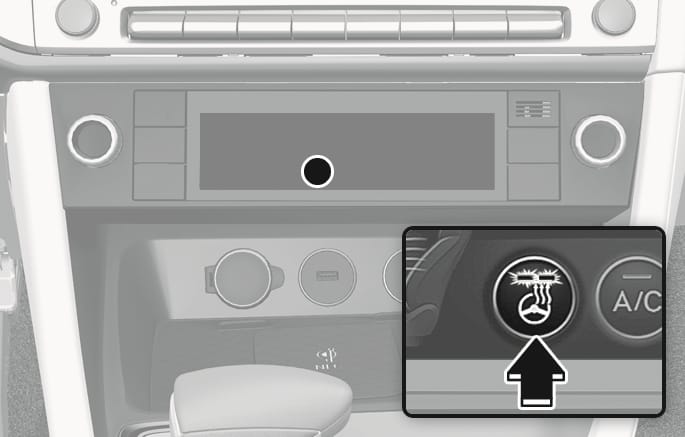
OIK053010
While the engine is running, touch the heated steering wheel icon to warm the steering wheel.
-
Manual temperature control
Each time you touch the icon, the temperature setting of the steering wheel changes as follows:
-
OFF > HIGH > LOW > OFF
-
-
Automatic temperature control
The heated steering wheel starts to automatically control the steering wheel temperature after being manually turned ON.
-
When HIGH is manually selected:
The heated steering wheel automatically changes to the LOW position after 30 minutes. You can turn off the heated steering wheel by touching the icon to the OFF position.
-
When LOW is manually selected:
The heated steering wheel is not controlled automatically.
-
-
Link to Climate Settings for Auto-Adjustment (for driver's seat)
The heated steering wheel automatically controls the steering wheel temperature depending on the ambient temperature when the engine is running.
If you touch the heated steering wheel icon, the heated steering wheel will have to be controlled manually.
To use this function, it must be enabled from the Settings menu in the infotainment system.
Select: Setup > Vehicle > Seat (or Climate) > Warmer/Ventilation Features > Link to Climate Settings for Auto-Adjustment > Steering Wheel Warmer
-
The heated steering wheel defaults to the OFF position whenever the Engine Start/Stop button is pressed to the ON position. However, if the Link to Climate Settings for Auto-Adjustment function is ON, the heated steering wheel will turn on and off depending on the outside temperature.
The infotainment system may change after software updates. For more information, refer to the infotainment system manual.
Do not install any cover or accessory on the steering wheel. The cover or accessory could cause damage to the heated steering wheel system.